Get notified and gain insight into your website's chatbot

Get notified and gain insight into your website's chatbot

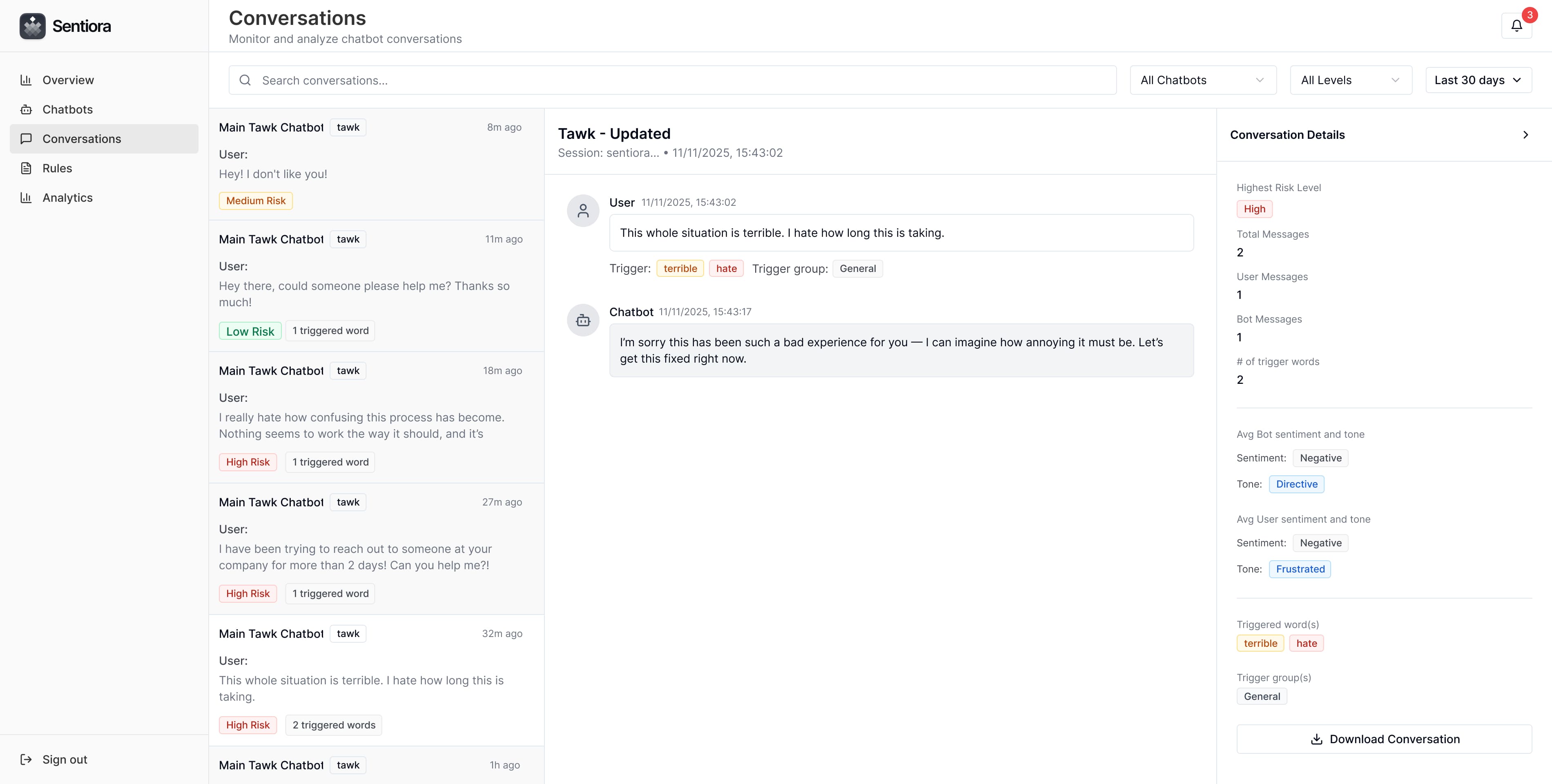
Monitor your website's chatbot interactions in real time and keep a closer eye on how they communicate. Sentiora detects messages that may be risky, misleading, or off-tone, analyzes sentiment, and tracks important keywords—all while notifying you instantly when high-severity terms or behaviors appear.
https://app.sentiora.io/dashboard

Works with these chatbots (more coming soon)

Why?

Chatbots represent your brand in every conversation. We’re here to make sure they do it well—by helping you track tone, identify risks, and stay consistent across every message on your website.

Chatbots represent your brand in every conversation. We’re here to make sure they do it well—by helping you track tone, identify risks, and stay consistent across every message on your website.

Chatbots represent your brand in every conversation. We’re here to make sure they do it well—by helping you track tone, identify risks, and stay consistent across every message on your website.

Chatbots represent your brand in every conversation. We’re here to make sure they do it well—by helping you track tone, identify risks, and stay consistent across every message on your website.

Real-time monitoring
Email alerts
Keyword alerts
Conversation logs
Tone detection
Sentiment tracking
Chat export
Features

Clarity and Insight into your Chatbot Conversations

Gain visibility into every message your website chatbots send. From tone and sentiment analysis to real-time alerts and message tracking, our platform helps you understand how your bots communicate— and when they might need attention.

Real-Time Monitoring

Real-Time Monitoring

Track every chatbot interaction as it happens. Get a live view of messages across your website to identify potential risks, inconsistencies, or off-tone responses.
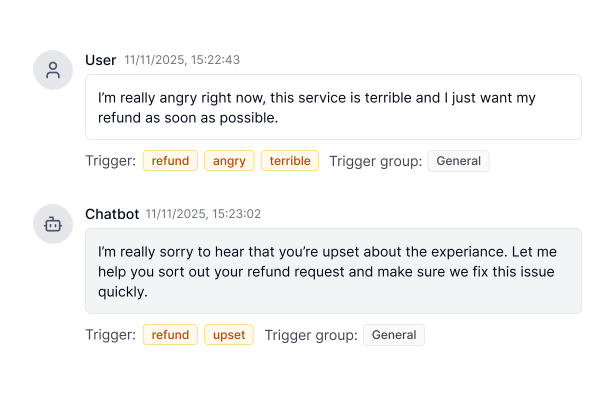
Tone & Sentiment Analysis

Tone & Sentiment Analysis

Analyze the emotional tone behind your chatbot’s replies. Understand whether messages sound friendly, neutral, or negative—and ensure they align with your brand’s voice.
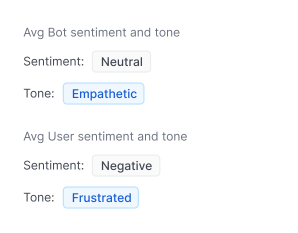
Keyword Tracking

Keyword Tracking

Create keyword-based triggers that flag or alert your team when specific terms appear in chatbot conversations, helping you stay proactive and informed.
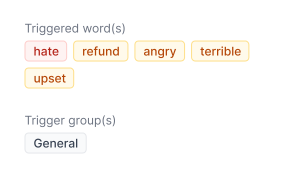

Risk Classification

Risk Classification

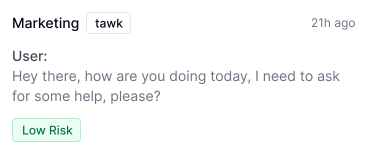
Messages are scored and categorized as low, medium, or high risk, helping teams quickly spot areas that may require review or escalation.
Email Alerts & Notifications

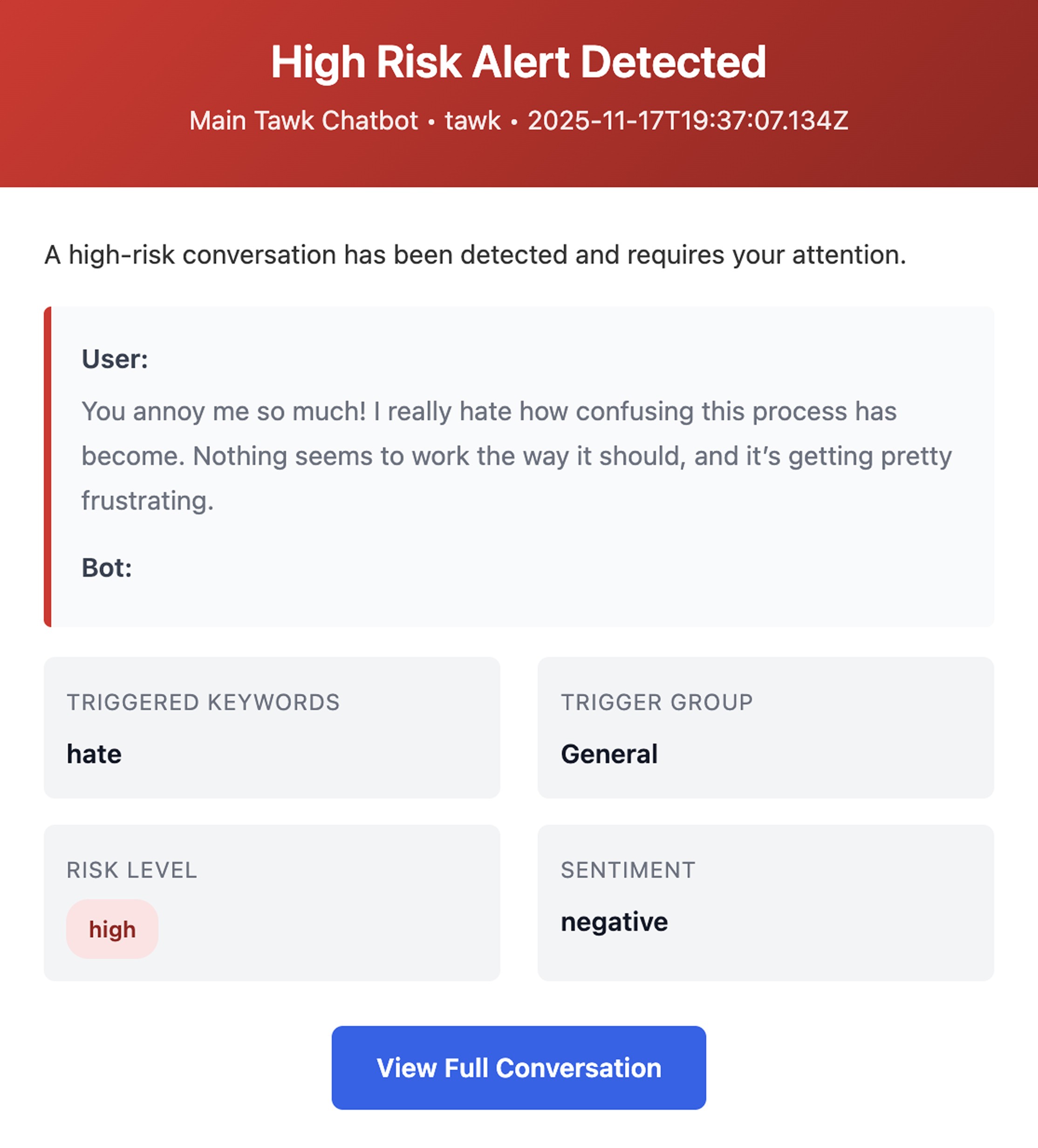
Email Alerts & Notifications

Receive instant email alerts when risky or off-tone messages are detected—so your team can act quickly when something unusual happens.
Conversation Export & Logs

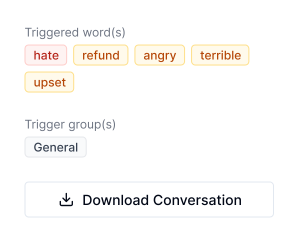
Conversation Export & Logs

Easily export or review chatbot conversations for deeper analysis. Keep an accurate record of interactions for quality checks, reports, or training.
Pre-made keyword templates

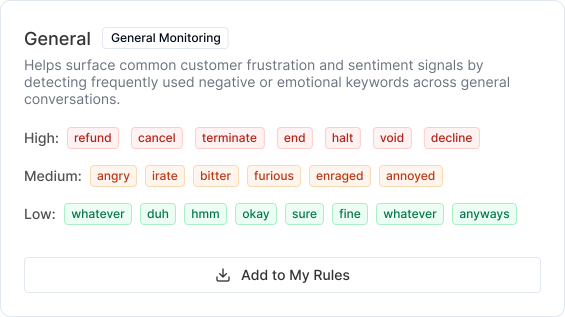
Pre-made keyword templates

Start monitoring instantly with ready-to-use keyword templates built for common scenarios like customer frustration, safety concerns, and abusive language. These templates help your team detect important signals faster—without needing to configure rules from scratch.
Pricing

Simple Pricing

Choose a plan that fits your needs, budget, and growth.

Free Plan

For getting started with chatbot monitoring

$

0

$

0

/ Month

Added Features
  • 1 Chatbot

  • 300 messages monitored / month

  • Email alerts

  • Tone & sentiment analysis

  • Custom rules and rule templates included

  • Keyword detection

  • Chat export

  • 30-day conversation history

Pro Plan

For teams who need complete monitoring & alerts

$

9

$

9

/ Month

Everything in Free, plus:
  • Unlimited chatbots

  • Unlimited messages

  • 90-day conversation history

  • Free 7-day trial included

Free Plan

For getting started with chatbot monitoring

$

0

$

0

/ Month

Added Features
  • 1 Chatbot

  • 300 messages monitored / month

  • Email alerts

  • Tone & sentiment analysis

  • Custom rules and rule templates included

  • Keyword detection

  • Chat export

  • 30-day conversation history

Pro Plan

For teams who need complete monitoring & alerts

$

9

$

9

/ Month

Everything in Free, plus:
  • Unlimited chatbots

  • Unlimited messages

  • 90-day conversation history

  • Free 7-day trial included

Free Plan

For getting started with chatbot monitoring

$

0

$

0

/ Month

Added Features
  • 1 Chatbot

  • 300 messages monitored / month

  • Email alerts

  • Tone & sentiment analysis

  • Custom rules and rule templates included

  • Keyword detection

  • Chat export

  • 30-day conversation history

Pro Plan

For teams who need complete monitoring & alerts

$

9

$

9

/ Month

Everything in Free, plus:
  • Unlimited chatbots

  • Unlimited messages

  • 90-day conversation history

  • Free 7-day trial included

Explore our FAQs

Explore our FAQs

Find quick answers to commonly asked questions about Sentiora.

Find quick answers to commonly asked questions about Sentiora.

How does Sentiora monitor my website’s chatbot?

Sentiora connects to your existing chatbot using a lightweight script placed on your website. It listens for both user and bot messages in real time, analyzes them, and flags anything unusual — such as risky keywords, off-tone replies, or inconsistent responses. No changes to your chatbot are required.

How does Sentiora monitor my website’s chatbot?

Sentiora connects to your existing chatbot using a lightweight script placed on your website. It listens for both user and bot messages in real time, analyzes them, and flags anything unusual — such as risky keywords, off-tone replies, or inconsistent responses. No changes to your chatbot are required.

What types of issues can Sentiora detect?

Sentiora uses keyword detection, tone signals, and your custom rules to help highlight chatbot conversations that may need review. While it can't catch everything, it gives teams clearer visibility into interactions that could be important to check.

What types of issues can Sentiora detect?

Sentiora uses keyword detection, tone signals, and your custom rules to help highlight chatbot conversations that may need review. While it can't catch everything, it gives teams clearer visibility into interactions that could be important to check.

Do I need to change my chatbot setup to use Sentiora?

No changes to your chatbot are required. Sentiora simply observes conversations that occur on your website once the script is installed.

Do I need to change my chatbot setup to use Sentiora?

No changes to your chatbot are required. Sentiora simply observes conversations that occur on your website once the script is installed.

How does Sentiora send alerts or notifications?

When messages contain keywords that match rules you’ve set up, Sentiora sends an email alert summarizing what was detected. This helps bring potentially important interactions to your attention more quickly.

How does Sentiora send alerts or notifications?

When messages contain keywords that match rules you’ve set up, Sentiora sends an email alert summarizing what was detected. This helps bring potentially important interactions to your attention more quickly.

Can I customize the keywords or rules Sentiora monitors?

Yes. You can create your own rules or use pre-made templates. This allows you to shape the types of message signals you want your team to review more closely.

Can I customize the keywords or rules Sentiora monitors?

Yes. You can create your own rules or use pre-made templates. This allows you to shape the types of message signals you want your team to review more closely.

Does Sentiora store customer conversations?

Sentiora stores messages only for the purpose of monitoring and displaying them in your dashboard. Your data remains yours, and nothing is used for model training or shared externally.

Does Sentiora store customer conversations?

Sentiora stores messages only for the purpose of monitoring and displaying them in your dashboard. Your data remains yours, and nothing is used for model training or shared externally.